# Buy & Sell
### Buy an Asset
**Buying your first token manually.**
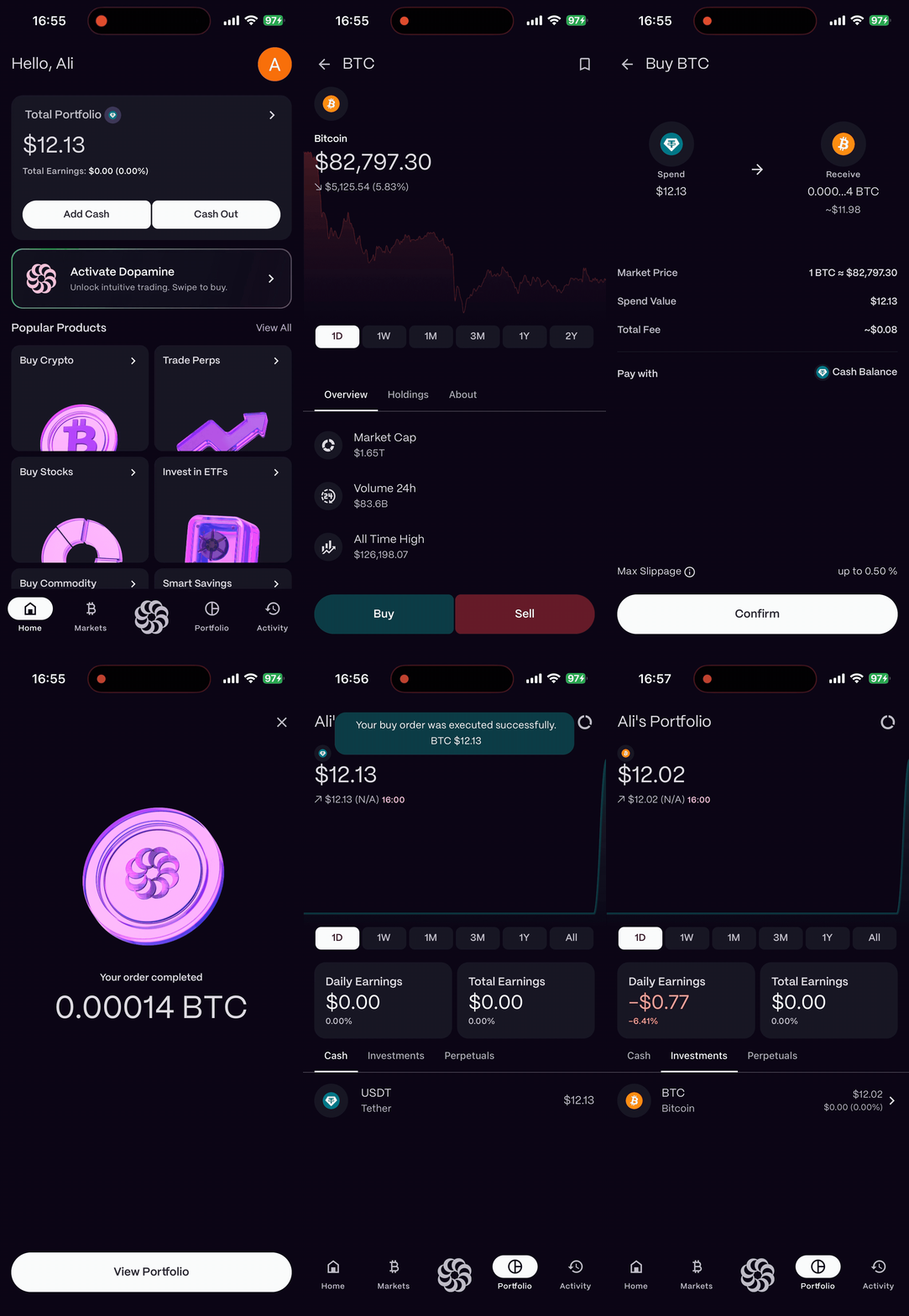
1. Navigate to the **Market** tab.
2. Search for the token you wish to buy (e.g., "Bitcoin").
3. Tap **Buy**.
4. Enter the amount **(in USD)**.
5. Choose the payment method:\
\- **Buy with Cash:** Select this option to purchase assets using your available **USDT balance**. \
\- **Pay with My Assets:** Select this option to pay using your existing portfolio holdings, such as **BTC, ETH, NVDA, TSLA, or Gold**.
6. Review the fee and purchase details.
7. **Tap to Confirm.** Your assets will appear in your account instantly.
{% hint style="info" %}
**Buy with Cash:** Select this option to purchase assets using your available **USDT balance**.
{% endhint %}
{% hint style="info" %}
**Pay with My Assets:** Select this option to pay using your existing portfolio holdings, such as **BTC, ETH, NVDA, TSLA, or Gold**.
{% endhint %}
{% hint style="info" %}
\*Your **Cash Balance** represents the **USDT balance** available in your account.\
\***Pay with My Assets** allows you to use assets already held in your portfolio as a payment method.\
\***Apple Pay** will allow you to make payments easily using your Apple Pay account. (soon)
{% endhint %}
### Sell an Asset
**Ready to take profits?**
1. Go to your **Portfolio** and select the asset you want to sell.
2. Tap **Sell**.
3. Enter the percentage (e.g., 25%, 50%, Max).
4. **Confirm Sale.** The funds will move to your cash balance.
---
# Agent Instructions: Querying This Documentation
If you need additional information that is not directly available in this page, you can query the documentation dynamically by asking a question.
Perform an HTTP GET request on the current page URL with the `ask` query parameter:
```
GET https://grand-2.gitbook.io/grandlabs/tutorials/quickstart-4.md?ask=
```
The question should be specific, self-contained, and written in natural language.
The response will contain a direct answer to the question and relevant excerpts and sources from the documentation.
Use this mechanism when the answer is not explicitly present in the current page, you need clarification or additional context, or you want to retrieve related documentation sections.
.gif?alt=media&token=ba539785-02ae-4d95-bfdc-c2bff66ec617)
.gif?alt=media&token=217171c8-836d-4840-a865-e77a95b98900)