> For the complete documentation index, see [llms.txt](https://grand-2.gitbook.io/grandlabs/llms.txt). Markdown versions of documentation pages are available by appending `.md` to page URLs; this page is available as [Markdown](https://grand-2.gitbook.io/grandlabs/tutorials/quickstart-4.md).
# Buy & Sell
### Buy an Asset
**Buying your first token manually.**
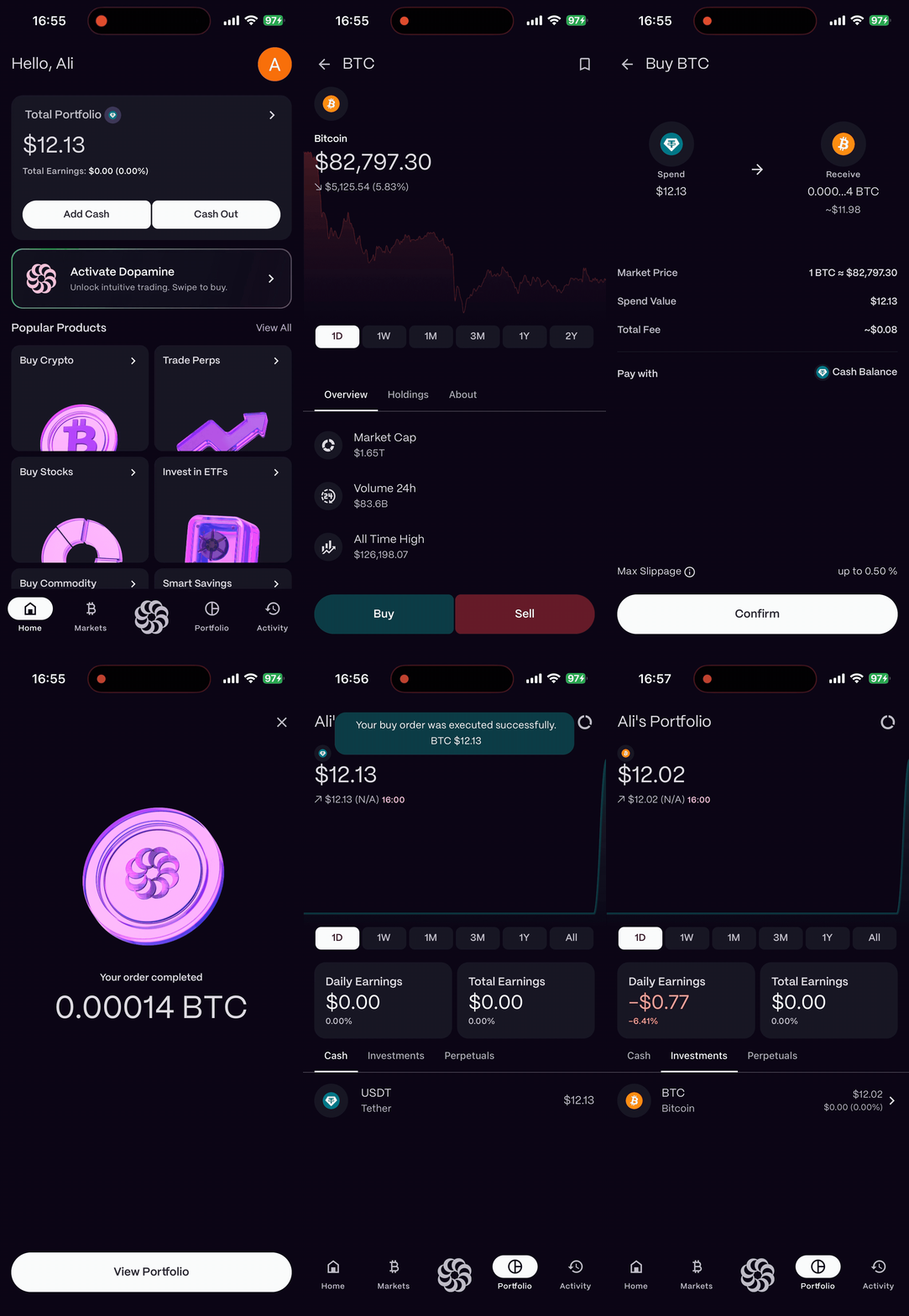
1. Navigate to the **Market** tab.
2. Search for the token you wish to buy (e.g., "Bitcoin").
3. Tap **Buy**.
4. Enter the amount **(in USD)**.
5. Choose the payment method:\
\- **Buy with Cash:** Select this option to purchase assets using your available **USDT balance**. \
\- **Pay with My Assets:** Select this option to pay using your existing portfolio holdings, such as **BTC, ETH, NVDA, TSLA, or Gold**.
6. Review the fee and purchase details.
7. **Tap to Confirm.** Your assets will appear in your account instantly.
{% hint style="info" %}
**Buy with Cash:** Select this option to purchase assets using your available **USDT balance**.
{% endhint %}
{% hint style="info" %}
**Pay with My Assets:** Select this option to pay using your existing portfolio holdings, such as **BTC, ETH, NVDA, TSLA, or Gold**.
{% endhint %}
{% hint style="info" %}
\*Your **Cash Balance** represents the **USDT balance** available in your account.\
\***Pay with My Assets** allows you to use assets already held in your portfolio as a payment method.\
\***Apple Pay** will allow you to make payments easily using your Apple Pay account. (soon)
{% endhint %}
### Sell an Asset
**Ready to take profits?**
1. Go to your **Portfolio** and select the asset you want to sell.
2. Tap **Sell**.
3. Enter the percentage (e.g., 25%, 50%, Max).
4. **Confirm Sale.** The funds will move to your cash balance.
.gif?alt=media&token=ba539785-02ae-4d95-bfdc-c2bff66ec617)
.gif?alt=media&token=217171c8-836d-4840-a865-e77a95b98900)